I released v1.15.0 of my skills. engineering-standards now asks for explicit argument labels and gains semantic code layout conventions, covering declaration ordering, enum projections and multiline Swift layout, in a new references/layout.md. wrap-up can now resume from HANDOFF.md after a clear, so the next session picks up the parked context instead of me pasting it back in. The Swift examples in behavior-tests are now generic rather than tied to one app.
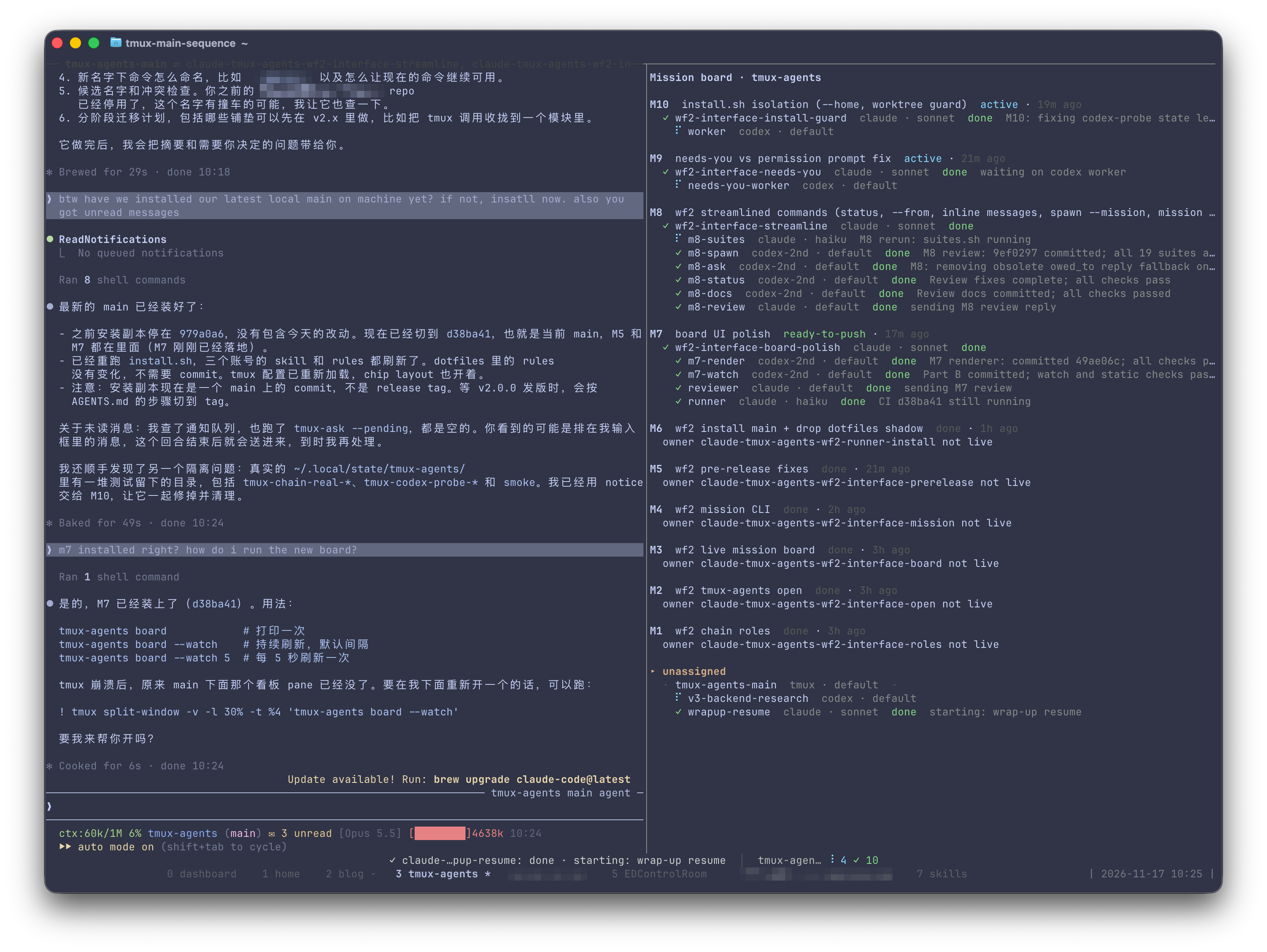
The main agent on the left, tmux-agents board --watch on the right. Click for the full size.
I'm rebuilding how my tmux-agents team works. The old main → secondary → worker chain burned most of its tokens on a secondary that never cleared its context and got the most messages: on the tmux-agents project alone, the secondary used 143M tokens to the main's 91M. Now there is one Opus main that only talks to me and decides, a short-lived Sonnet interface per mission that hands out the work, reviews it and lands it, then closes, plus Codex workers, Opus reviewers and Haiku runners for tests and CI.
Each mission is a record managed with tmux-agents mission, shared across worktrees, and tmux-agents board --watch is a live, read-only pane that groups every agent under its mission with its model, state and progress. One glance and I can see the whole team.
It's part of a bigger push to trim the fat. A fresh Claude session used to spend about 50k tokens before I typed anything; after measuring and cutting unused tools, MCP servers and hidden skills, it starts at about 16k. And I wrap up, then clear far more often, so no agent drags 150k of scrollback through every request.
All of it is coming soon: role-based spawning, mission records, the board and a single tmux-agents status command will ship together as tmux-agents v2.0.0, with posts on the new team flow and on where my Claude tokens actually went.
I released v1.12.0 of my skills. The error-boundary rule in engineering-standards now says that when a boundary normalises a failure, it keeps the diagnostics that failure needs, in logs or error metadata as the boundary chooses. Intentional cancellation counts as lifecycle control, not a request failure the user has to handle. Typed errors owned by each layer stay as they were, and the rule still doesn't prescribe how to surface underlying errors, a universal cancelled case or a logging implementation.
I shipped v1.24.1 of tmux-agents to correct the digest's reading command to tmux-notes --all --keep-unread and tighten up recovery after clearing an agent's context. A short resume phrase restores the existing chain role, using a temporary, never-committed HANDOFF.md to choose what to continue. The main agent also checks and updates the new session's resume ID in main-sequence, waiting for Codex to finish its first turn before recording it. All 68 offline test suites, seven PR CI checks and the required probes on two Codex accounts passed; I've updated the local installation and status chip.
I released v1.11.0 of my skills. engineering-standards now has rules for what crosses a boundary: no enum that only mirrors domain cases to serialize them, a wire-format value only when it is a deliberate choice, named payloads when several values travel together, members grouped by responsibility in Swift's order, and a test rule to assert the final wire output. wrap-up now offers numbered choices for what to keep before a session clear, and parks the picked context in a local, uncommitted HANDOFF.md so the next session picks up where this one stopped.
I shipped v1.24.0 of tmux-agents, which adds quiet notes for the chatter between agents that doesn't need to interrupt anyone. tmux-ask --note leaves a note instead of pasting a prompt, and tmux-notes reads them with one read cursor per receiver; Claude gets an unread summary through its prompt hook and Codex checks at turn start. After five minutes idle (configurable), an agent gets a digest that continues from the last update until I speak, bare tmux-notes --count feeds status lines, and the "stopped without replying" reminder now arrives as a quiet note. The agent-chain rules also spell out what stays a reply, a request or a notice.
I released v1.9.0 of my skills. Every item in a design-lab gallery now has a short, stable ID in a chip with a Copy ID button, and each round's landing page lists every item with its ID. When the phone blocks the clipboard, the chip's text is selected and the page says "Selected, copy it". It came out of reviewing social preview cards from my phone, where pointing at "the third Glass card, the dark one" got old fast; now I paste C3-glass-series-dark back and the agents know exactly which one I mean.
I shipped v1.23.4 of tmux-agents, a patch release that makes clearing a session by hand a supported path. After /new in Codex, the next turn end with a verified agent ID rebinds the pane and its record to the new thread, so tracking and tmux-spawn --resume follow the latest conversation instead of staying stuck on working. Parents no longer get a "stopped without replying" reminder while a child is still working, and a new prompt or delivery clears the old activity label. In tmux-peers and tmux-connect --list, the COMMAND column now shows the agent kind (claude, codex or a Codex profile) and marks it (exited) when it has quit, instead of showing the shell that started it.
I wrote The Blog Themes I Would Never Have Built, and the Freedom to Be Picky about exploring eleven theme options while working on three to five other projects over a day of on-and-off work. It follows the design lab, the ideas I kept or dropped, and the theme switcher I kept refining with the agents. AI made trying cheap enough to take more possibilities seriously, but getting the design right still needed human judgement.
I shipped v1.23.3 of tmux-agents to fix spawned Codex agents appearing to be working while stuck at a folder trust prompt. Agents launched through tmux-spawn, including Codex profiles, now show permission, pause their work timer and tell their parent that the task has not started yet. The user still decides whether to trust the folder; nothing confirms it automatically. All 64 offline test suites, seven cross-platform CI checks and release probes on two accounts passed.
I shipped v1.23.2 of tmux-agents, a patch release that removes tmux-clear-context and the chain-reset skill from v1.23.0 and v1.23.1. Instead, I clear agents by hand and tell the main agent it is the main of an existing chain. The agent-chain skill now explains how a restarted main, secondary or worker finds its members with tmux-peers and re-briefs them instead of starting a new chain. install.sh removes the stale links. The fix that records Claude's new session ID stays.
I shipped v1.23.1 of tmux-agents, a patch release for tmux-clear-context. It now treats the dim suggestions and placeholders in Claude and Codex prompts, such as gray history ghost text or "Ask Codex to do anything", as an empty prompt, so idle agents can be cleared. If it refuses after typing the command, it erases the command again when that is safe; otherwise the error says the input was left as is. Refusals for a working agent now show how old the recorded state is.
I shipped v1.23.0 of tmux-agents, a minor release with a new command and skill. tmux-clear-context --from ME PEER clears a stopped Claude or Codex sub agent in place, sending /clear or /new while keeping its pane, name and connections. It refuses when the agent is working, in copy mode, mid-typing, has queued messages or has text in its prompt. Claude now records its new session ID at each turn start, so resume follows an agent across a /clear. The new chain-reset skill builds on it: after I clear the main agent, /chain-reset collects unfinished work, then clears and re-briefs the secondary and worker.
I released v1.8.0 of my skills. It ships two new skills: engineering-standards, the foundation I want every app to start from, and catch-up, which answers "catch me up" with only what changed since my last message. afk now briefs me on return in the same catch-up shape, and agent-docs keeps each SKILL.md to the minimal core, with everything else in linked reference files.
I added catch-up to my skills in b40a054. I come back from a break or a flood of agent notices and ask "catch me up" or "cmu". I want only what changed since my last message, concise and in a fixed shape: what landed, what is pending or blocked, and a decision only if one is needed. Long recaps bury the decision and repeat messages I can already read, so the skill also rules out preamble, tool narration and restating what's already on screen.
description: Brief the user on what changed since their last message, in a fixed shape. Use when the user says "catch me up", "cmu", "since my last message", "what happened", 发生了什么 or 进展.
---
# Catch up
Cover only what happened after the user's last message. Use these parts in order, omitting any part with no content:
1.**Landed:** what landed and the state now.
2.**Pending:** what is pending or blocked.
3.**Decision:** a decision the user must make, as one question with options.
Use one or two sentences per part. Concise means shape and density. Do not restate messages the user can read directly, such as a secondary's replies in a chain; do not narrate tool calls. No preamble or closing.
"What are you doing / why is it slow" is not a catch-up: answer that first in one or two sentences, then continue the work.
I added engineering-standards to my skills in 8329df9. I want every app I build to start from the same foundation: simple objects, strong single responsibility, strong boundaries, full dependency injection, and state and logic you can test. Writing it down once means agents build to that standard by default, instead of me re-explaining it on every project.
Five core rules up front.SKILL.md holds them, each a principle with its Swift form; 17 more rules sit in three reference files (structure and dependencies, screen state and presentation, tests) loaded only when needed.
Fake the world, keep my layers real. Tests replace only the outside world; canned values at a unit's own injected functions are fine, recording mocks are out.
Precise values stay precise. Money and similar values use a decimal type parsed from strings.
description: Build and review app code to a fixed set of engineering standards (simple objects, single responsibility, strong boundaries, full dependency injection, testable state and logic), each stated as a principle with its Swift or SwiftUI form. Use when designing or reviewing app architecture, wiring dependency injection, writing view models or view states, mapping network responses and errors into domain types, applying code layout conventions, or when the user says "our standards" or "to our engineering standards".
---
# Engineering standards
Principle first, then the Swift form as one example; in another language, use its plainest idiom for the same rule. Test shape, doubles, factories and fixtures are in the `behavior-tests` skill; the rules in the tests reference add only what that skill leaves open.
## Core
1.**Simple objects.** Values and functions before classes and interfaces. Domain and view-state types are immutable values; computation is pure functions grouped by topic. A class only where mutable, observed state lives (the view model); an interface only for a real boundary, never one interface and one mock per dependency. Swift: `let`-only structs and enums, `static func`s on a `nonisolated enum`, one `@Observable` class per screen.
2.**Strong single responsibility.** One type, one job, named after the job. Networking alone is four types: configuration (base URL, version), endpoints (paths), client (fetch and decode), mapper (wire type to domain). The reverse holds too: actions that share one piece of state stay in one type instead of being split to shorten it.
3.**Strong boundaries.** Each layer speaks only its own types, and raw data stops at the edge. A weather DTO holds the server's strings; the repository maps it to a `Forecast` with typed temperatures; every failure becomes the layer's own error before it crosses. Callers consume capabilities (`fetchForecast`), never construct lower layers. A view sees view states, never a DTO or the client.
4.**Full dependency injection.** Every side effect (network, stored data, a delay's length) is passed in at construction with no default, so a caller can't forget it and a test can't be fooled by a built-in. One composition root: the entry point reads the configuration switches and builds the live wiring as locals in one function; preview or demo wiring is a second set that doesn't ship. Nothing below the root reads a global. Time and delays are injected only when a test needs to control them; a presentation delay doesn't earn a clock. Swift: `@Sendable` closures in `init`; `Dependencies+Live.swift`, and `Dependencies+Preview.swift` behind `#if DEBUG`; no `URLSession.shared` outside the root.
5.**Testable state and logic.** State is a value you can assert on: one state enum with payloads, readable by all and written only by its owner's actions. Logic is a pure function whose inputs (locale, units, the loaded data) are parameters, so a test needs no environment. Tests drive the real types through the user's flow and fake only the outermost boundary. Swift: `enum State: Equatable`, `private(set) var state`, `#expect(viewModel.state == .loaded(expected))`.
## Reference
- Read [structure.md](references/structure.md) when separating view models from view states, wiring dependencies, defining configuration, concurrency, validation and error boundaries, choosing request serialization or boundary payloads, naming functions and their argument labels, grouping members and function stages, or choosing enum projections versus behavioural pattern matching.
- Read [layout.md](references/layout.md) when formatting multiline conditions, arguments, parameters or nested calls.
- Read [screen-state.md](references/screen-state.md) when deriving screen state, formatting values, guarding async actions, extracting components or documenting escape hatches.
- Read [tests.md](references/tests.md) when choosing test boundaries, recording fixture provenance, covering screen states offline or verifying request wire output.
## Done
Each changed type has one job and a name that says it, every side effect enters through its initialiser, every new boundary has its own types and error, and each behaviour has a test that reads as the user's flow with only the world faked.
I released v1.4.1 of my skills. It ships design-lab, a private lab for comparing mockups and image rounds on one phone-friendly index before building anything. Its local server never serves hidden files or directory listings, with offline tests in the release checks, Tailscale is now optional, and dark screenshots set the colour scheme explicitly so they no longer depend on the Mac's own appearance.
I shipped v1.22.0 of tmux-agents, a minor release with new options. Rows in a tmux-agents main sequence now accept command=CMD: the window opens at the project directory, runs the command in the configured shell, and keeps an interactive shell afterwards even if the command fails. add, set and unset edit the field. I use it to start the Agent Fleet Command server alongside the other windows. The agent-chain skill also gains an optional Fleet Command section: when the fleet-command CLI is installed, chains follow the missions skill, with the main registering missions, the secondary reading the inbox and owning status, and the worker logging progress. Without it, chains behave exactly as before.
I added design-lab to my skills in 549cfa8. With how easy it is to try things with AI agents, I like to experiment with designs, and this skill captures the lab I ran while redesigning this blog's themes: every mockup round, image round and verdict on one private, phone-friendly index, before any real code.
Nothing reviewed gets overwritten. Each revision is a new folder next to the old one, so I compare against what I actually saw.
Verdicts are my words. Loved, Approved, Not picked and Dropped are only recorded when I say so, and each one lands in the gallery, the index and the plan at the same time.
Phone first and private. Every page is checked at phone width in light and dark, served from a no-store local server on 127.0.0.1, shared over my tailnet only when one is available.
A finalists view with a side-by-side compare mode helps pick a default once most verdicts are in.
description: Run a private design lab for a project, with throwaway mockups and image rounds on one phone-friendly index the user reviews on their phone or the same machine, ending in a decision recorded in the plan. Use when the user wants to explore visual directions, themes, mockups, covers or image options before building, asks for a lab, a gallery, a revision round or a finalists view, or says 设计实验室 / 出几版看看.
---
# Design lab
The lab answers "which direction?" before any real code. Its output is a decision written in the plan doc, never production code. Everything in it is throwaway.
## Rules
-**Private and uncommitted.** The lab lives in a gitignored, build-ignored drafts folder (e.g. `local-drafts/lab/`). Check both ignores before the first file. Nothing in it reaches git, a build, a push or a message to another project.
-**Serve only what is visual.** The served root holds the index plus symlinks to mockup and image folders; never drafts, notes, `.temp`, `.env` or secrets. Bind to 127.0.0.1 with caching off. If a tailnet is available, use `tailscale serve` for phone review; otherwise review on the same machine at 127.0.0.1. Never bind to 0.0.0.0 or substitute a public tunnel.
-**Never overwrite a reviewed version.** A revision is a new folder next to the old one (`x-r2`, `x-r3`, `paper-contrast-a/b/c`, `dark-aurora`, `dark-indigo`). The user compares against what they saw.
-**Phone first.** Check every page at 390px: one column, no horizontal scroll. Every mockup in light and dark unless it is declared single-scheme. Record body and label contrast ratios (aim for 7:1 body text) in each round's notes.
-**Verdicts are the user's words.** Badges: Loved, Approved, To review, To pick, Not picked, Dropped, On hold. Never mark anything approved, picked or dropped unless the user said so; quote them in the note. If a verdict is ambiguous ("aurora indigo": one palette or two?), confirm before recording it.
-**Image rounds.** Unless the user gives an art direction, let the model choose and vary styles. Save every prompt in `prompts.json`. No text, logos, trademarks or personal details in images. Note the target crop ratio (e.g. 100:56) and check each image in that crop. Record each rejected round with the user's reason ("too close to X's style") so the next round avoids it.
-**In an agent chain:** the main relays verdicts as notices and revision asks as requests; answer each revision round with one batched reply holding all links.
## Ops
1.**Start the lab.** Run [scripts/serve-lab.py](scripts/serve-lab.py) `<lab dir> [port]` in the background. With a tailnet, optionally run `tailscale serve --bg --https=<port> <port>` for phone review; otherwise use `http://127.0.0.1:<port>` on the same machine. Done: the tailnet URL loads the index on the phone, or the loopback URL loads it locally; in either case, a reload after an edit shows the edit.
2.**Create the index once.** Copy [references/lab-index-example.html](references/lab-index-example.html) to `<lab dir>/index.html` and replace its sample rows. One row per experiment of any kind (mockups, image rounds, covers): title, date, status, note with verdicts, thumbnail. Done: every experiment the user has seen is a row.
3.**Add an experiment or round.** Build it in its own folder, symlink it into the lab root, add or update its row. Done: the row links to it, its thumbnail loads, and it passes the phone and light/dark checks.
4.**Build a gallery** for a round with several items, following [references/gallery.md](references/gallery.md). Done: it opens with "To pick / review", every item shows what changed since the user's last review and a stable ID with Copy ID, the round landing page lists every item with its ID, and links work.
5.**Record each verdict** in the gallery badge, the index row and the plan doc in the same step. Done: the three agree.
6.**Finalists view** once most items have verdicts: only final picks, no before or unpicked versions, plus a compare mode (same page across all finalists, light/dark, desktop/phone) for choosing a default. Done: linked from the gallery top and the index.
7.**Close out.** Write the decisions in the plan doc, mark everything else Not picked or On hold with the reason, and hand the agreed plan to implementation. Done: no row is left "waiting" without saying what it waits for.
## Failure modes seen
-**Stale cache hid new rows.** The fix is the no-store server; never serve the lab with a caching server.
-**The index showed only one kind of experiment.** Image rounds and mockups both need rows; nothing reviewed may exist only in chat.
-**A "kept" verdict assumed from silence.** Without the user's words it stays To review.
-**Copying instead of taking inspiration.** When the user points at a reference style, ask what to keep from it; a round that copies the reference gets rejected.
-**Agents left to decide the art direction** produced rounds nobody picked. After two unpicked rounds, stop and ask the user for direction instead of generating more.
I shipped v1.21.2 of tmux-agents, a patch release with two fixes. tmux-peers no longer prints a stale "closed by user" hint when a live connected agent has reused a closed agent's name; the closed agent's saved conversation is still kept for --resume. And tmux-connect --list and the picker now mark and order the caller's own window correctly when sessions share linked windows (grouped sessions), by matching window ids instead of session:index.
Today, from a conversation on my phone, an agent fleet mocked up more than eleven design directions for this blog in an afternoon: Terminal, Brutalist, Warm Paper, Swiss, Soft Glass, a retro web zine, Liquid Glass in dark and light, and three takes on sci-fi. I'd say what I liked and what felt weak, and a few minutes later there were new options to look at.
On my own, I would never have even imagined doing eleven themes. One, maybe two, over a few weekends. Now I love all eleven, and they're all going forward.
So that's the plan: these become the v2 themes, readers get to pick the one they like, and they go back into 11ty Subspace Builder so every site built on it can use them too. The current looks become v1, and they'll be sunset.
I updated Vision Pro MVD / ALVR Best Practices - No More Stuttering!: the network carries four flows, not two. Besides ALVR and MVD to the headset, Parsec and the EDControlRoom hub and peer talk between the PC and the Mac. Those two stay on Ethernet through the VR router and use no airtime, so the post now lists all four, the network diagram shows the wired links, and the Parsec check ties back to them.
I shipped v1.21.1 of tmux-agents, a patch release. install.sh now writes relative symlink targets when both the link and its target live under the home directory, so reinstalling keeps dotfiles-tracked skill links like ~/.codex-2nd/skills/* clean, and links that are already correct are left alone. It also fixes an intermittent preview-header test.
I shipped v1.21.0 of tmux-agents, which replaces the request ledger with turn state. A running turn shows as working and an ended turn shows as idle or done, while parents show live "waiting on" text from their nearest working descendants. Replies no longer need a request ID, and a one-slot stop notice remembers the latest requester. tmux-spawn also passes agent CLI arguments after --, saves them with the sub agent and brings them back on resume.
I published Everything All At Once: AI & Intentionality, which grew out of an evening thinking entry after a day of running an agent chain in every tmux window. With AI I can push four or five projects at once, but the bottleneck is still my own brain, and handing more decisions to agents means less of what I do is something I actually meant. The post is about noticing when that happens, and choosing, on some days, to slow down and stay with one or two things long enough to remember why each decision was made.
Today was a busy one. Every tmux window had an agent chain working at the same time, and by the evening there were about 85 commits across six repos.
My skills went public. I moved them out of my dotfiles into their own repo, TheClooneyCollection/skills. You can install them as a Claude Code or Codex plugin, or with npx skills. v1.0.0 went out in the morning and v1.2.0 by the evening. Along the way I added three new skills, and every skill got a README and a one-line reason for existing.
A stutter fix became a post and a skill. ALVR on my Vision Pro kept stuttering. It came down to AWDL channel hopping, and moving the router's primary channel to 44 fixed it. That turned into a post, a skill, and a new Gaming series.
Illustrating the post became a skill too. Claude drew the diagrams, Codex generated illustrations in three different styles, and I picked from one gallery page. That's illustrate-post now.
tmux-agents shipped twice.v1.19.0 and v1.20.0, then a design doc in the afternoon about how it tracks what each agent is doing.
The rest kept moving. My dotfiles caught up with all of the above, and EDControlRoom got a few late-night ideas.
With AI, it almost feels like you can do anything. I could never have dreamed of working on three, four, even five projects at once. But ever since AI became this capable, I've found myself working like this every now and then. It feels less like coding and more like running a small studio. Tiring, but the good kind of tired.
But I keep coming back to one question: was I spending that time and energy intentionally?
I did decide a lot today: what to ship, what to cut, which image, when to push. But I also gave the agents a lot of room to decide for me. Sometimes I didn't have the energy. Sometimes I couldn't be bothered. Sometimes I just didn't mind. (I wrote more about where that line sits in The Two Extremes of AI-Assisted Engineering.)
That's a trade-off, and it's fine, as long as you, the one deciding, are okay with it.
Still, I think this is what AI is quietly taking away from us: intentionality. When you can do everything at once, it gets easier to stop asking whether you meant to. There's less of it than there used to be.
I want to notice when that happens. And when I have the energy to give, I want to be more intentional myself. Maybe slowing down once in a while isn't such a bad idea either.
I released v1.2.0 of my skills. It ships two new skills: illustrate-post, which turns a post's images into a plan, hand-drawn SVG diagrams, image-model variants in a few styles and one gallery to pick from, and avp-mvd-alvr-stutter-resolver, which fixes Vision Pro stutter when Mac Virtual Display and ALVR run together. Every skill folder now also has a short README for people: what the skill does, why it exists, when to use it and what it needs.
Plan first. The agent reads the post and proposes the images with me: what each one shows, where it goes, and whether it is an exact diagram or a mood or hero image. Nothing is generated before I approve the list.
Two kinds of producer. Claude hand-draws the diagrams as SVG, where labels and numbers have to be right, each with a dark twin. An image model renders every concept in 3 or 4 clearly different style families, so each family is a consistent set.
One gallery. Every variant lands in one local HTML page, side by side. I pick per image and mix styles freely; when I like a composition but want a change, the agent edits that image instead of starting over.
Only the picks land. The chosen images go into the post, narrower than the text and centred, with SVG diagrams swapping to their dark twins with the site theme.
The Vision Pro post ended up with three of Claude's diagrams, two Midnight Blueprint illustrations and one Paper Circuit floor plan, picked out of a gallery of more than twenty images.
description: Illustrate a blog post or doc with image variants from several models, shown side by side in one HTML gallery for the user to pick from. Use when the user asks for images, illustrations, diagrams or a hero image for a post or doc, or wants image options to choose from.
---
Several producers each make a **variant** of every **concept** (one image slot in the post); the user picks per concept from one gallery, mixing producers and styles freely. Nothing enters the repo until they pick.
1.**Plan.** Read the post and propose the concepts: what each image shows, where it goes, and whether it is a diagram (exact labels, numbers, real data) or a mood or hero image, and whether it carries text. Name who makes what. Done: the user approved the list; nothing is generated before that.
2.**Produce, in parallel,** into a gitignored folder: `.temp/<topic>-images/<variant>/NN-<concept>.<ext>`. Check `.gitignore` covers it.
-**Diagrams: hand-drawn SVG by Claude.** Self-contained, with its own background card, plus `<title>` and `<desc>`. Make a dark twin, `NN-<concept>-dark.svg`: remap the palette, keep the meaning of each colour readable. Render both to PNG (`rsvg-convert`), look at them, fix overlaps and clipped text, repeat. CSS `text { fill }` beats a `fill=` attribute, so colour single elements with `style="fill:..."`.
-**Every concept: an image model** (Codex's image tool, or another agent's; without one, hand this to an agent that has it). Ask for 3 or 4 clearly different style families, each applied to every concept so a family is a coherent set; leave the rest of the art direction open. Save each family's prompts in `<variant>/prompts.json`.
- Generated images: no logos or trademarks, generic devices, no personal details. Text follows the plan, concept by concept. Models garble it, so ask for short, explicit wording, verify every word and number, and regenerate anything garbled.
Done: every producer delivered its files.
3.**Gallery.** Copy [gallery.html](gallery.html) into the folder and fill its `concepts` and `variants` lists. Serve it with `python3 -m http.server <spare port> --bind 127.0.0.1`. To browse from another device, offer the user's private network (e.g. `tailscale serve`) and ask first. Done: the URL loads and every image shows.
4.**Review and pick.** Each producer lists its own weak spots. Send the user the gallery link with those notes. When they like an image's composition but want a change, edit that image (an image edit with it as the reference) rather than generating a new one. Done: the user picked one image per concept.
5.**Land the picks.** Copy only the chosen images into the repo (check whether it keeps images in Git LFS) and wire them into the post:
- Show images narrower than the text column and centred, around 560px, a hero around 640px. A hero can close the post too.
- An SVG with a dark twin goes in as two `<img>`, one per theme, swapped by one shared CSS rule keyed on the site's theme selector or `prefers-color-scheme`.
- Image pipelines may rasterise SVGs (JPEG with black corners); route SVGs around the transform.
Build, then look at the post in both themes and commit. Ask before pushing. Done: the build passes, both themes look right, and only the picks are committed.
I published Vision Pro MVD / ALVR Best Practices - No More Stuttering!, about running Mac Virtual Display and ALVR on an Apple Vision Pro at the same time while playing Elite Dangerous in VR. ALVR stuttered even on a clean channel, because AWDL kept pulling the Mac's radio onto its own social channel; putting the router's primary channel on AWDL's channel (44 in the UK) stopped the hopping, and the ALVR retest confirmed the stutter is gone. The post walks through the network layout and router settings I recommend, and links the avp-mvd-alvr-stutter-resolver skill for anyone who wants an agent to check their setup.
I added avp-mvd-alvr-stutter-resolver to my skills in 197e34a, turning what I wrote up in Vision Pro MVD / ALVR Best Practices - No More Stuttering! into something an agent can run. It audits and fixes Apple Vision Pro stutter for Mac Virtual Display and ALVR: AWDL channel hopping, the router's channel and width, the wired path, subnets and GPU encoder contention. The fix is verified twice: the AWDL schedule now stays on a single channel, and ALVR no longer stutters.
My own agent skills moved out of my dotfiles into skills, and v1.0.0 is the first release. You can now install them without my setup: as a Claude Code plugin, a Codex plugin, or with npx skills add TheClooneyCollection/skills. The release also adds a release skill, which cut this release, and a CI check that keeps the skills, the plugin manifests and the README in step.
I shipped v1.20.0 of tmux-agents, which moves my project launchers into tmux-agents itself. tmux-agents main-sequence opens the configured project windows in order, with optional names and plain shells, and tmux-agents chain picks a project from the current directory, the saved projects or an optional scan root. The config is editable with list, add --at N, set and unset, with nothing personal hardcoded. tmux-agents start chain --main-resume ID resumes just the main conversation, with Claude reconnecting Remote Control through /rc, and sub agents spawned by a profiled Codex agent now inherit that profile, including on resume.
I shipped v1.19.0 of tmux-agents, which makes long messages explicit: tmux-ask and tmux-spawn take --message-file, so an agent sends a summary plus the full text, the recipient reads it with tmux-read <id>, and automatic truncation is gone. Agents now get resume hints and can resume in place with tmux-spawn --resume --here, and a requester is notified when a sub agent stops without replying, replacing "reply overdue". Claude hooks are hardened, with StopFailure handled, tool hooks clearing permission waits, and AskUserQuestion and MCP input dialogs marking "needs you". Resumed Codex agents are tracked, finished agents keep their last report, ownership survives a gone ancestor, and a new probe checks Codex compatibility.
I published The Two Extremes of AI-Assisted Engineering: Fast and Furious, vs. Slow and Careful, about the two opposite ways I work with the same coding agents: letting them run while I barely read the code, and slowing down until every decision is mine. It uses EDControlRoom as the example of a project moving along that spectrum, and argues that the real decision is where to set the quality bar for each project right now, and when to move it. This is the third version; I wrote it section by section after setting two earlier drafts aside.
I clear my agent sessions a lot now. Long sessions get slow and expensive, and after a while the agent is mostly rereading old tool output. The thing that kept me from clearing was the worry that something useful would go with it: a gotcha we hit, a decision and the reason for it, a half-finished branch.
So I wrote a small skill called wrap-up. Before I clear, I say "wrap up" and the agent goes through the session and reports back. It changes nothing until I choose.
Lessons not yet written down. Corrections I made, gotchas we found, decisions and why. It checks the repo docs, AGENTS.md, skills and memory first, and leaves out anything already there or obvious from the code.
Where each one should go, with the exact wording. An AGENTS.md rule, a repo doc, a skill, or personal memory, plus one line on why.
What it would skip, and why. I can overrule it, and it stops the notes from slowly piling up.
Unfinished work. Running agents, open worktrees, uncommitted or unpushed changes, questions I never answered.
I pick the ones I want, it writes them, and I clear. Sometimes the answer is "none of these". The agent can work them out again quickly, and a note that is never needed is just more to read next time.
What I get out of it: clearing becomes a habit instead of a gamble. Sessions stay short and cheap, and the next agent starts from what was actually learned, not from 200k tokens of scrollback.
description: Before the user clears the session, report what is worth saving and what is unfinished; after the clear, resume from the handoff. Use when the user says they will clear, reset or end the session, or says 收工 / 要清 session 了; or, after a clear, says "cleared, resume please", "cleared resume" or 清完了,继续.
---
Change nothing until the user picks.
-**Number the choices:** separate completed work worth recording, unfinished work that could continue, and live state that needs attention (background jobs, agents, worktrees, uncommitted or unpushed changes). Ask the user to choose what to save, continue or drop by number. Unselected old work stays pending, never resumes automatically.
-**Lessons not yet recorded:** user corrections, gotchas found, workflows explained only in chat, decisions and their reasons. Check repo docs, AGENTS.md, skills and memory first; drop what is already there or readable from the code. Also drop anything you got right on your own or caught yourself this session; keep only what would likely go wrong again without a note.
-**For each, propose a home and the wording:** an AGENTS.md rule, a repo doc, a skill, or memory (personal preference or setup), with one line of why.
-**List what you would skip,** with the reason, so the user can overrule.
-**After the choice:** save approved lessons to their agreed homes. Write information needed across a clear to the project-root `HANDOFF.md`: goal, roles and member names, relevant branches and worktree paths, live state, and the user's explicit choices, then a fixed "Resume steps" section: the commands the next session runs first (project-specific; none if nothing applies). Work not explicitly chosen to continue is listed only as pending selection.
-**Local handoff only:** before creating or updating `HANDOFF.md`, verify it is untracked and add `/HANDOFF.md` to the repository's local Git exclude file (`git rev-parse --git-path info/exclude`), not shared ignore rules. Never commit it. If already tracked, report the conflict before writing. Read any existing file first and preserve other chains' and the user's content.
-**Clear entries when resolved:** remove an entry only when completed, explicitly dropped, or transferred to a persistent record the user approved. Delete the file when every entry is resolved; reading it alone is not grounds for deletion. Leave unresolved entries for the next session.
-**Resume:** after a clear, read `HANDOFF.md`, run its Resume steps, then report the next actions to the user. Do not re-brief other agents or restore roles unless the user asks.
I've been spending the day refining EDControlRoom, building new features, polishing little details, improving the README, and even getting a new logo designed that I'm particularly happy with.
And I had this wonderful realization: my little side project is growing into a mature product.
It has a name, an identity, a proper interface, documentation, tests, releases, cross-platform support… It's no longer just a bunch of code I wrote to solve a problem. It's becoming something real. Something I'm genuinely proud to put out into the world.
There's a particular kind of happiness in this.
It's not just the excitement of getting something to work. It's the satisfaction of ownership and craftsmanship. Taking an idea from your head, bringing it into existence, and slowly shaping it into something thoughtful, polished, and complete.
It reminds me of woodworking, actually. That feeling of starting with a sketch, working with your hands, refining every little detail, and eventually stepping back to admire something that didn't exist before.
I love that with my own projects, I get to decide what deserves attention. What good engineering looks like. What makes a good user experience. How far I want to take an idea.
Just me, my curiosity, my ideas, and the joy of making things.
I think I've missed this feeling more than I realized.
And today, looking at that beautifully polished README, the new logo, and all the little features coming together, I just feel… happy.
Not because I've achieved something enormous. Not because it's going to make money or change the world.
But because I made something, I care about it, and I love what it's becoming.