在和 agent 的聊天太乱?里,我给配置又加了一个 agent:主 agent,它唯一的工作就是和我对话。它把工作交给 secondary,secondary 协调一个 Codex worker,worker 再把工作分给自己启动的 agent。我只和主 agent 说话。
这套配置最初只是一个项目 AGENTS.md 里的几段话。一周后,它已经内置进 tmux-agents,我在每个项目里都在用。
从操作步骤到一条命令
第一次是手工搭的。开一个新窗格,连接到现有的 Claude agent,告诉它现在是主 agent、只和我对话,再告诉原来那个 agent 它现在是 coordinator,还要确保主 agent 不 连接 Codex。能用,但每个项目都得把这套步骤重复一遍。
现在这些角色写在 agent-chain skill 里。我对一个 Claude agent 说 "start the chain",剩下的它自己完成:把自己改名为主 agent,在右边启动 secondary,再在 secondary 下方启动 worker。也可以在 shell 里运行:
tmux-agents start chain ~/Source/Projects/my-project
它会为这个项目开一个新窗口,并以 "start the chain" 作为第一条提示启动 Claude。
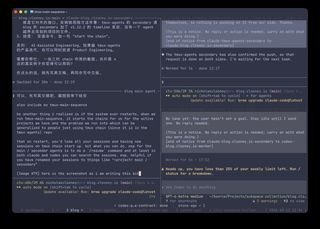 博客的 chain,当时我正在告诉主 agent 下面"重启之后"一节该写什么:左边是主 agent,右上是 secondary,右下是 Codex worker。
实际用下来改了什么
思路没变。用了一周之后,有几个细节改了。
FYI 用 notice,不用 request。 最初的规则是给 FYI 标上"无需回复"。这不够。在 tmux-agents 里,不管内容写了什么,request 都会让接收方重新开工,发送方也会等它回复。于是一个已经做完的 agent 被一条 FYI 唤醒,如果它没回复,就会显示为需要我处理。现在有了单独的 notice 消息,不需要回复,也不需要做事。
secondary 和 worker 是 member,不是子 agent。 一开始 chain 是用普通的子 agent 搭的。所以它们会和临时帮手一起出现在子 agent 列表和状态 chip 里,清理已完成的子 agent 时也可能把它们关掉。现在它们是长期 member:不出现在默认列表里,也不参与批量清理,但需要我时照样会提醒。
chain 是看得见的。 启动的 agent 通常在隐藏窗口里运行,要从列表里查看。chain 的三个我都想放在屏幕上,所以 secondary 和 worker 以分屏的形式开在主 agent 的窗口里。
coordinator 改叫 secondary。 小改动,但现在所有 skill、指南和消息都用同一个名字称呼它。
跨项目
我最喜欢的一条规则是关于项目之间怎么沟通的。每个项目的 secondary 是它对其他项目的接口。请求在 secondary 之间传递,agent 只修改自己项目的文件。
举个真实的例子。tmux-agents 每次发布,博客都要加一条 timeline 条目。v1.12.2 发布时,tmux-agents 的 secondary 没有自己打开博客仓库去写,而是请博客的 secondary 来做。博客的 secondary 写好并提交,然后告诉博客的主 agent:提交好了,但还没推送,因为推送会部署网站。主 agent 来问我,我推送了。
没有谁伸手去改不属于自己的项目,唯一需要我决定的事,以一个问题的形式来到我面前。
重启之后
我已经不再一个个地启动 chain 了。我有一个小脚本 tmux-main-sequence,用来搭起整个 tmux session:一个 dashboard 窗口,一个 home 目录窗口,一个博客窗口,再加上配置文件里每个项目各一个窗口。除了 dashboard,每个窗口都会用同样的 "start the chain" 提示启动一个 chain。
#!/usr/bin/env bash # tmux-main-sequence — join the standard project session group## Usage: tmux-main-sequence [--add-missing] [--no-attach]## Windows: 0 dashboard (shell), 1 ~, 2 blog, then configured projects.# Each client joins through its own main-N session, with independent window selection.# Existing group windows are unchanged unless --add-missing is given.# Per-client sessions are destroyed on detach; the base session stays available.# Config: ~/.config/tmux-main-sequence/projects, one directory per line.# Blank lines and full-line # comments are ignored; spaces in paths are supported.# Example config (local and untracked):# ~/Source/Projects/tmux-agents# ~/Source/Projects/projects-stone-age# ~/Source/Projects/job-hunting/career-ops set -euo pipefail usage() { cat <<'EOF'Usage: tmux-main-sequence [--add-missing] [--no-attach] Create or join the main session group through a separate main-N client session.Client sessions share windows but select them independently and vanish on detach.An existing group or a base session named main is reused. --add-missing Add missing window names with fresh agents, then join. Use the intended index if free; otherwise append at the end. --no-attach Skip joining: do not create a per-client session or attach. -h, --help Show this help. Environment: TMUX_MAIN_SEQUENCE_SESSION Group/base name (default: main; clients: main-N). TMUX_MAIN_SEQUENCE_CONFIG Project list (default: ~/.config/tmux-main-sequence/projects). TMUX_MAIN_SEQUENCE_AGENT Shell command (default: tmux-agents start claude -- "start the chain"). TMUX_MAIN_SEQUENCE_SOCKET Isolated tmux socket name (tmux -L). Project list: one directory per line, with ~ expansion, blank lines andfull-line # comments. Missing directories are warned about and skipped.EOF} add_missing=falseattach=truefor arg in "$@"; do case "$arg" in --add-missing) add_missing=true ;; --no-attach) attach=false ;; -h|--help) usage; exit 0 ;; *) printf 'tmux-main-sequence: unknown argument: %s\n' "$arg" >&2 usage >&2; exit 2 ;; esacdone session=${TMUX_MAIN_SEQUENCE_SESSION:-main}config=${TMUX_MAIN_SEQUENCE_CONFIG:-$HOME/.config/tmux-main-sequence/projects}script_dir=$(CDPATH= cd -- "$(dirname -- "${BASH_SOURCE[0]}")" && pwd)tmux_cmd=(tmux)if [[ -n ${TMUX_MAIN_SEQUENCE_SOCKET:-} ]]; then tmux_cmd+=(-L "$TMUX_MAIN_SEQUENCE_SOCKET")fi attach_session() { local number=1 client_id if "$attach"; then while "${tmux_cmd[@]}" has-session -t "=$session-$number" 2>/dev/null; do number=$((number + 1)) done client_id=$("${tmux_cmd[@]}" new-session -d -t "$session_id" -s "$session-$number" -P -F '#{session_id}') if "$fresh"; then "${tmux_cmd[@]}" select-window -t "$client_id:1" fi # Queue the option and attach together: a standalone set-option would # immediately destroy this still-unattached session before we could join it. if [[ -n ${TMUX:-} ]]; then "${tmux_cmd[@]}" set-option -t "$client_id" destroy-unattached on \; switch-client -t "$client_id" else "${tmux_cmd[@]}" set-option -t "$client_id" destroy-unattached on \; attach-session -t "$client_id" fi fi} fresh=falsesession_id=base_id=# A group may survive after its originally named session has been removed.while IFS='|' read -r id name group; do if [[ $group == "$session" ]]; then session_id=$id break fi if [[ $name == "$session" ]]; then base_id=$id; fidone < <("${tmux_cmd[@]}" list-sessions -F '#{session_id}|#{session_name}|#{session_group}' 2>/dev/null || true)session_id=${session_id:-$base_id}if [[ -n $session_id ]]; then if ! "$add_missing"; then attach_session exit 0 fielse fresh=true session_id=$("${tmux_cmd[@]}" new-session -d -s "$session" -n dashboard -c "$HOME" -P -F '#{session_id}') "${tmux_cmd[@]}" set-option -t "$session_id" base-index 0 "${tmux_cmd[@]}" set-option -t "$session_id" renumber-windows off initial_index=$("${tmux_cmd[@]}" display-message -p -t "$session_id:" '#{window_index}') if [[ $initial_index != 0 ]]; then "${tmux_cmd[@]}" move-window -s "$session_id:$initial_index" -t "$session_id:0" fi "${tmux_cmd[@]}" set-window-option -t "$session_id:0" automatic-rename off "${tmux_cmd[@]}" set-window-option -t "$session_id:0" allow-rename offfi add_window() { local index=$1 name=$2 dir=$3 start_agent=$4 existing max=-1 occupied=false pane while IFS= read -r existing; do [[ $existing != "$name" ]] || return 0 done < <("${tmux_cmd[@]}" list-windows -t "$session_id" -F '#{window_name}') if [[ ! -d $dir ]]; then printf 'tmux-main-sequence: skipping missing directory: %s\n' "$dir" >&2 return 0 fi while IFS= read -r existing; do if (( existing == index )); then occupied=true; fi if (( existing > max )); then max=$existing; fi done < <("${tmux_cmd[@]}" list-windows -t "$session_id" -F '#{window_index}') if "$occupied"; then printf 'tmux-main-sequence: index %s occupied; appending %s at %s\n' "$index" "$name" "$((max + 1))" >&2 index=$((max + 1)) fi if "$start_agent"; then "$script_dir/tmux-chain" "$dir" --target "$session_id:$index" --name "$name" >/dev/null else pane=$("${tmux_cmd[@]}" new-window -d -t "$session_id:$index" -n "$name" -c "$dir" -P -F '#{pane_id}') "${tmux_cmd[@]}" set-window-option -t "$pane" automatic-rename off "${tmux_cmd[@]}" set-window-option -t "$pane" allow-rename off fi} add_window 0 dashboard "$HOME" falseadd_window 1 '~' "$HOME" trueadd_window 2 blog "$HOME/Source/Projects/subspace-collection/blog.clooney.io" trueindex=3if [[ -f $config ]]; then while IFS= read -r dir || [[ -n $dir ]]; do # Trim surrounding whitespace, preserving spaces inside directory names. dir="${dir#"${dir%%[![:space:]]*}"}" dir="${dir%"${dir##*[![:space:]]}"}" case "$dir" in ''|'#'*) continue ;; '~') dir=$HOME ;; '~/'*) dir="$HOME/${dir:2}" ;; esac while [[ $dir != / && $dir == */ ]]; do dir=${dir%/}; done add_window "$index" "$(basename "$dir")" "$dir" true index=$((index + 1)) done < "$config"fiif "$fresh"; then "${tmux_cmd[@]}" select-window -t "$session_id:1"fiattach_session
这很好用,直到机器重启。tmux 和里面所有的 agent 一起消失。再运行 tmux-main-sequence,窗口都回来了,也启动了新的 chain,但它们都是新的 session。主 agent 不记得我们在聊什么,secondary 也忘了做过哪些决定。
这不是我的脚本特有的问题。任何用 tmux-agents start chain 的人都会遇到:重启后 chain 从头开始,上下文没了。
解决办法很简单。Claude Code 和 Codex 都会把过去的 session 保存在磁盘上,也都有可以搜索它们的 /resume 命令。所以重启之后,我在主 agent 的窗格里运行 /resume,搜到之前的 session,接着聊。
通常我只恢复这一个。没有重要的工作在进行时,新的 secondary 和 worker 就够用了。但要具体情况具体看:如果 secondary 或 worker 正在做重要的事,我也会恢复它们,让工作从停下的地方继续,而不是从头再来。
session 有名字的话,恢复起来方便得多。如果它们叫 "blog main agent"、"blog secondary" 这样的名字,一秒就能找到。没有名字的话,你得翻一整列第一条提示全是 "start the chain" 的 session。
试试看
用 skills CLI 安装 tmux-agents,agent-chain skill 也包含在内:
npx skills add TheClooneyCollection/tmux-agents -g
然后告诉你的 agent "set up tmux-agents",装好之后,再说 "start the chain"。