The Confident Lie: What AI Got Wrong About @ViewBuilder
Part of a series
- Swift & SwiftUI Series (4 of 5)
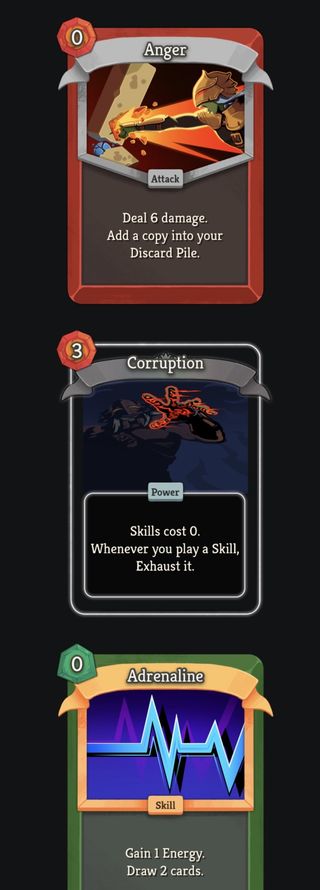
I was building a card component in SwiftUI. Some cards have a portrait border image, some do not. It is an optional asset, so I had this and notice how Corruption does not have borders around the card's artwork:
var portraitBorder: some View {
    if let border = card.portraitBorder {
        Image(border)
            .resizable()
            .cardAssetColor(card.rarityColor)
            .frame(width: 275, height: 210)
            .offset(x: 12.5, y: 47)
    } else {
        EmptyView()
    }
}
It didn't work, and it felt verbose. So I asked an AI to suggest a cleaner approach.
The Suggested Fix
The AI confidently told me to drop the else { EmptyView() }. Apparently @ViewBuilder handles the missing branch automatically, and since computed some View properties already get @ViewBuilder implicitly, this would just work:
var portraitBorder: some View {
    if let border = card.portraitBorder {
        Image(border)
            .resizable()
            .cardAssetColor(card.rarityColor)
            .frame(width: 275, height: 210)
            .offset(x: 12.5, y: 47)
    }
}
Clean. Idiomatic. But WRONG.
The compiler immediately complained. So I pushed back.
The Confident Lie
The AI doubled down. It reassured me that computed some View properties do get @ViewBuilder implicitly, just like body does. Drop the else, it said. It will work.
It did not work.
This is the failure mode worth naming: an AI that is wrong, gets corrected by a real compiler error, and still holds its position. Not because it is being stubborn. It genuinely does not know what it does not know. It reasoned from a plausible-sounding rule: body does not need @ViewBuilder explicitly, therefore computed view properties probably do not either. Then it stated that rule with the same confidence it would use for something it actually knew.
The fix, which the AI eventually acknowledged after being pressed again and again, is simply this:
@ViewBuilder
var portraitBorder: some View {
    if let border = card.portraitBorder {
        Image(border)
            .resizable()
            .cardAssetColor(card.rarityColor)
            .frame(width: 275, height: 210)
            .offset(x: 12.5, y: 47)
    }
}
One annotation. So why does it matter so much?
Why body Does Not Need It
The important distinction is where the builder annotation comes from.
Apple documents View.body as a protocol requirement annotated with @ViewBuilder. That means a conforming view's body implementation inherits the result builder behavior from the protocol requirement. The magic is not attached to every computed property that returns some View; it is attached to this specific protocol requirement.
Conceptually, SwiftUI's View protocol looks like this:
public protocol View {
    associatedtype Body: View
    @ViewBuilder var body: Self.Body { get }
}
That is why this works:
struct Example: View {
    var body: some View {
        if isEnabled {
            Text("Enabled")
        }
    }
}
Your custom computed property has no protocol requirement to inherit from:
var portraitBorder: some View {
    if let border = card.portraitBorder {
        Image(border)
    }
}
Without @ViewBuilder, Swift treats that getter as ordinary Swift code. An if statement without an else branch does not produce a value on every path. That is a compiler error.
What @ViewBuilder Actually Does
@ViewBuilder is a result builder. Result builders are a Swift language feature that let specially annotated functions, properties, subscripts, or closure parameters transform a block of statements into a single result value.
Under the hood, a result builder defines static methods with specific names, and the compiler rewrites your block to call them. The relevant methods for this case are:
buildBlock(...), which combines multiple child results into one resultbuildIf(_:)in SwiftUI'sViewBuilder, which handles anifwithout anelsebuildEither(first:)andbuildEither(second:), which handleif/elseandswitchbranches
So when you write:
@ViewBuilder
var portraitBorder: some View {
    if let border = card.portraitBorder {
        Image(border)
    }
}
Swift no longer treats the body as a plain getter that forgot to return something on one branch. It applies the result builder transform and lets ViewBuilder represent the optional view-producing branch as one concrete result.
Without @ViewBuilder, none of that transformation happens. Swift just sees a getter that sometimes does not return a value, and it refuses to compile it.
The Broader Pattern
This is the same mechanism that makes SwiftUI's container syntax work:
VStack {
    Text("Hello")
    Text("World")
    Image("icon")
}
The trailing closure parameter on VStack is annotated with @ViewBuilder. The compiler rewrites the child view statements into one composed result, which is why the closure can contain multiple sibling views while still returning a single some View.
The key point is not that every SwiftUI-looking block gets this behavior. The key point is that the builder has to come from somewhere: a protocol requirement like View.body, a declaration you annotate yourself, or a closure parameter annotated by the API you are calling.
The Takeaway
The AI's suggested pattern was correct in spirit but wrong in one specific, compiler-enforced way. The if let without else { EmptyView() } is the idiomatic shape I wanted. It just requires explicitly opting in to @ViewBuilder on any computed property that is not body.
The rule is simple:
bodyinherits@ViewBuilderfrom theViewprotocol- Everything else needs its own
@ViewBuilderif you want result builder behavior
Trust the compiler over the AI. If they disagree, trust the compiler.
Written after a real debugging session. The AI has been informed of its error and has updated its priors accordingly. Probably.