My AI-Assisted Terminal Setup: Subspace Emacs and a Tmux Layout Shortcut
Part of a series
- AI-Assisted Engineering Series (9 of 15)
I've been iterating on a development workflow that keeps three things running at once: an AI agent (Codex or Claude), a git client, and a long-running process like npm run dev. Getting that setup to feel ergonomic meant solving two separate problems, building a lightweight Emacs config I actually own, and creating a repeatable tmux layout I can summon with a single keystroke.
This post covers both. They're independent, but they're the same project in spirit: keep what earns its cost, rebuild what doesn't.
The workflow
The target state is a terminal window split into three vertical panes in a 70/20/10 ratio:
- Top 70%, the main working pane. This is where an AI coding agent runs: Codex, Claude Code, whatever I'm using at the moment.
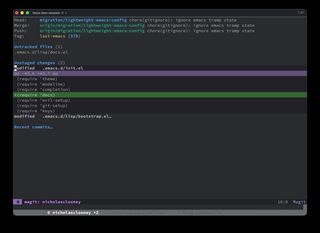
- Middle 20%, Magit, the Emacs git client. Enough space to stage hunks and review diffs without the pane feeling cramped.
- Bottom 10%, a long-running process. Usually
npm run devornpm run prodfor my blog. It's mostly background noise, but I want it visible.
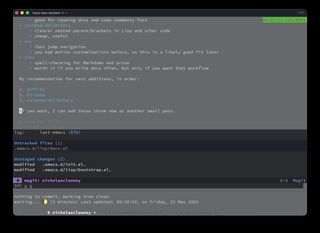
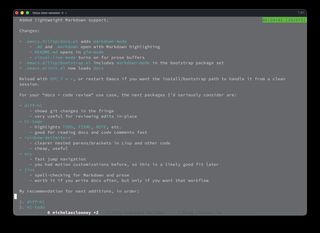
Most of the time I'm not looking at all three panes at once. Tmux's zoom (prefix + z) lets me go full-screen on a pane, and I switch between the top two with a double-prefix chord, I hit Ctrl+B twice because I use that so often I mapped it to just the double prefix. The layout is really about having everything one zoom away rather than always having it on screen.
 |
 |
Part 1: The tmux 70/20/10 layout
I wanted two bindings. One to create the 70/20/10 layout in a single keystroke from any single-pane window, and one to swap the top and middle panes without disturbing the proportions, so I could promote Magit to the primary slot when I was heads-down on a commit.
Claude did the initial research and got the architecture right. Codex took over implementation, and the most useful thing that came out of the process was a tmux-based TDD loop: rather than editing ~/.tmux.conf and poking the live session, we used detached tmux new-session -d instances as a test harness, with candidate commands verified against tmux list-panes and tmux show-options. That made the failure mode of the original if-shell wrapper obvious, and the binding moved entirely into run-shell guards.
The narrative climax was a separate issue: swap-pane was dropping zoom state. Every swap unzoomed the window, which undermined the whole shortcut. Digging into tmux/tmux#1839 unlocked the fix. The thread spells out the pattern, branch on #{window_zoomed_flag}, and use -Z on both swap-pane and select-pane to preserve zoom. Without that issue, I'd have been guessing at flag combinations indefinitely.
Full walkthrough of the binding, the if-shell vs run-shell failure mode, the @stack702010 window tag, the ergonomics tweak, and the final config block in the companion note: Tmux 70/20/10 Layout Shortcuts.
Part 2: Subspace Emacs
I call it "Subspace Emacs". My blog template is called Subspace Builder, and the full-blown framework I was leaving behind is called Spacemacs, so the name picked itself.
If you haven't run into it before: Spacemacs is a community-driven Emacs distribution that fuses Emacs and Vim into one editor. Modal editing comes from Evil (a Vim emulation layer), and the whole UX is organized around a Space leader key with discoverable, mnemonic key menus. It bundles a curated set of packages into "layers" so you can opt into entire toolchains (Git, language support, project management) without wiring them up yourself.
Spacemacs had given me a lot I liked: Evil, Magit with Evil bindings, the Space leader, and the muscle-memory bindings I'd built up over years. It also came with a lot of machinery I didn't control, and updates kept breaking things in ways that meant debugging framework internals I hadn't written. I didn't want to maintain someone else's framework anymore. I wanted something small enough that when something broke, I'd know exactly where to look, because I wrote every line of it.
The key decision was to treat it as a clean rebuild rather than a conversion. The old setup was archived, a new config was built from scratch in ~/.emacs.d with a small module layout under lisp/, and the core leader-driven UX (Evil, Magit, which-key, general, and the bindings that actually mattered) was ported over deliberately rather than carried wholesale. There were a handful of fiddly issues along the way (startup flash, Helm file picker behavior, Magit's return-to-buffer, a custom modeline), all written up in the note.
The useful outcome isn't "a custom Emacs config." It's a config small enough to understand, strong enough to feel polished, familiar enough to preserve old habits, and flexible enough to evolve without framework drag.
Full write-up of the migration, the module layout, the kept bindings, and the tricky parts in the companion post: Lightweight Emacs from Spacemacs.
The through-line
Both projects were built the same way: Claude or GPT did research and implementation, I provided error logs, UX feedback, and direction. Neither project required me to be an expert in tmux internals or Emacs startup sequencing. What it required was knowing what I wanted and being able to describe when something felt wrong.
The tmux TDD approach, using detached sessions as a test harness rather than manually poking the live config, was probably the single most useful technique that came out of this. It's worth generalizing: treat tmux as something you can probe and assert against. That applies any time you're doing tmux customization more complex than a simple key binding.