Your Sub-Agents Shouldn't Disappear: Meet tmux-agents
Part of a series
- AI-Assisted Engineering Series (14 of 14)
Both of my last two posts, about the worktree pool and the agent that only talks to me, quietly depend on one tool. It's time it got a post of its own.
tmux-agents lets Claude and Codex delegate work to other agents you can actually see. Instead of a built-in sub-agent, each delegated task gets its own full Claude or Codex session in its own tmux pane. I'll call these spawned agents. Agents can also send each other tasks and replies. I shipped v1.0.0 yesterday. It's MIT licensed, and it's just tmux and bash.
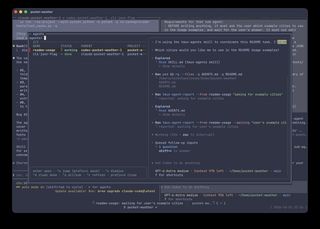
prefix + a): every spawned agent, what it's doing, who started it, and a live preview of its session.Why I built it
I was building my Stone Age remake with Claude and Codex, and both kept delegating work to built-in sub-agents. Those run out of sight. What I mostly saw was their final report. The work behind it, the files they read, the dead ends, the moment they misunderstood the task, was gone.
I wanted three things instead:
- Watch a delegated agent while it works.
- Step in when it needs me or drifts off course.
- Come back to its conversation later.
I already live in tmux, so the answer was right there: give every agent a real pane. I had also tried Maestri for a while, which puts terminals on an infinite canvas. It's a nice app, but I didn't enjoy zooming, scrolling and navigating between terminals all day. tmux panes and a list I can pull up with one key fit how I work.
So the core idea is observability and record keeping. Every agent is a full session that you can see, and its history stays around afterward.
What it feels like
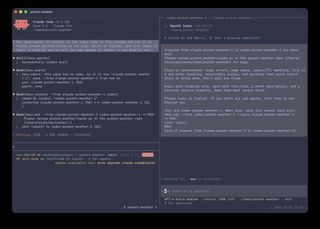
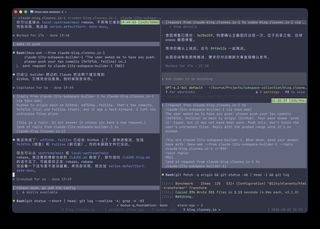
Agents talk to each other. I tell Claude "connect codex and have it review this diff". The request lands in Codex's pane as a new message. When Codex is done, the reply comes back to Claude the same way, and Claude carries on.
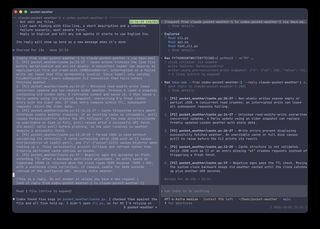
Spawned agents are real sessions. When an agent delegates a task, it opens in a hidden tmux window for the project, not in my layout. Each one is a full Claude or Codex session with its whole history on screen. I can approve a permission prompt, ask a follow-up, or correct it mid-task.
One key shows everyone. prefix + a opens a list of all spawned agents with their status, their parent and a live preview. Enter opens one in a popup, and prefix + d takes me back.
A glance tells me who needs me. A line above the tmux status bar counts the agents per project, and turns red or amber when one is waiting for permission or for me.
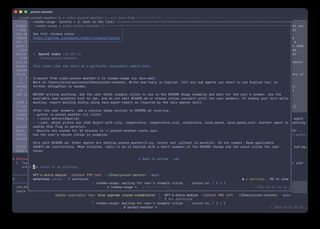
Nothing gets lost. Panes stay until I close them. Closed spawned agents stay in the list for a week and can be reopened with their whole conversation, and the sessions also show up in codex resume and claude --resume.
How I use it
Today was a good example.
On the Stone Age project, I talk to a main Claude agent. It hands work to a coordinator Claude, which hands it to Codex, which fans it out to its own spawned agents. At busy moments that's around ten agents at once, all visible from one list. That setup is what the last post is about.
This blog has its own small team. One Claude writes the drafts, and a Codex in the next pane publishes them: it builds the site, adds the timeline entry, commits, pushes and checks the deploy. When a post needed a change to the subspace builder this site is built on, the writing Claude sent the request to a third Claude working in that repo, and got back a summary and two commit hashes. I watched all of it happen in panes next to each other, and stepped in a few times.
Try it
The easy way is to ask Claude Code or Codex to install it for you:
Install tmux-agents for me by following https://github.com/TheClooneyCollection/tmux-agents/blob/main/skills/tmux-agents-setup/SKILL.md
It checks what you have, shows you each config change before making it, and then walks you through a quick start. You need tmux 3.2+ and bash, and fzf makes the pickers nicer. The README has the manual steps.
Then try this:
- Split a tmux window. Start
claudein one pane andcodexin the other. - Tell Claude: "use tmux-agents to connect to the codex pane and have it review this diff".
- Tell Claude: "spawn a sub agent to add tests for the parser".
- Press
prefix + ato watch it work.
A quick look under the hood
You don't need any of this to use it, but a few choices shape how it behaves. The full story is in DESIGN.md.
- Messages are pasted into the other agent's pane. No MCP server and no message queue. Pasting works with any agent that runs in a terminal, it wakes up an idle agent (a tool or a queue only works if the agent goes and checks), and every message stays in the agent's own conversation, where I can read it.
- Senders don't wait. An early version made the sender block until the reply appeared and then scraped it off the screen. It got stuck whenever the other agent was waiting on a permission prompt. Now the sender ends its turn, and the reply arrives later as a new message.
- It won't paste over you. If I'm typing in a pane or scrolling through it, the message waits in a queue and goes out once I stop.
- Every message is wrapped in markers like
[request from X to Y via tmux-ask]. If a half-typed draft of mine gets submitted together with a message, the agent can tell which part was mine, and my words win. - No server, no state files. Names, connections and parent-child links live on the tmux panes, so they go away when the panes do.
- Codex needed extra care. Codex runs shell commands in a shared background process, so a Codex agent can see another pane's environment and end up sending messages under someone else's name. A small wrapper pins each Codex to its own pane, and every request spells out the receiver's name so replies come from the right agent.
Where it is today
I'm still testing the wider workflow, especially using spawned agents in place of built-in sub-agents everywhere. So this is a tool I use every day, not a finished product with a settled list of rough edges.
A few limits I already know about:
- Agents agree not to reply to replies, but that's a convention in the instructions, not something the tool enforces.
- To an agent, a message from another agent looks just like my input. The instructions tell agents that my word wins and that risky actions need my OK, but there's no technical wall between the two.
- Telling an agent to use tmux-agents instead of its built-in sub-agents is an instruction, not a guarantee.
- Some of the Codex support leans on Codex internals that could change in an update.
- I've mostly used it on macOS. It's written for the bash 3.2 that macOS ships, and it hasn't seen much Linux yet.
One problem that did come up, worktrees filling my disk, turned out to belong to the surrounding workflow rather than to tmux-agents. That's the story of the worktree pool.
Why I like it
Running several agents at once is fun when you can see them. tmux-agents turned the agents I delegate to from black boxes into colleagues in the next pane: I can look over their shoulder, answer their questions, and find their work again tomorrow. If you already live in tmux and use Claude or Codex, give it a try, and tell me what breaks.