A Private Ingress Engine That’s Everywhere-Accessible but Publicly Invisible
Part of a series
- Networking & Infrastructure Series (1 of 11)
Most personal projects and homelab services don’t need to be public, but they do need to be reachable. I want to access my dev tools, internal dashboards, and side projects from anywhere, on any of my own devices, without opening ports, exposing IPs, or worrying about who might stumble across them on the internet.
This post walks through how I built an everywhere-accessible but publicly invisible ingress engine using Tailscale, Docker, Caddy, and DNS rewrites. The result is a private, domain-based setup that behaves like a small cloud. It has HTTPS, clean hostnames, and reverse proxying, but is only accessible to me, lives on my own machine, and never touches the public internet.
Before going any further, it’s worth addressing the obvious question.
Why not just use tailscale serve?
It does not scale for me.
I know about it. I use it. And honestly, it’s kind of magical.
You can run:
tailscale serve --https=8080 http://localhost:8080
and immediately access that service from another device in the same tailnet via:
https://device.your-tailnet.ts.net:8080/
For quick experiments or one-off services, this is fantastic.
That said, there are a few things I don’t love about relying on it as my primary setup:
- I have to remember to run the command
- I have to remember which port maps to which service
- "I only get one domain per device and I cannot use subdomains" - Gabriel Garrido
This becomes a real problem once you scale beyond a single service.
I’m running multiple websites and tools, including my resume project, my blog, and its template project, 11ty-subspace-builder. Each of these has both a dev and a prod version. Very quickly, I’m dealing with a growing list of ports, mental bookkeeping, and a setup that only exists in my head.
What I really want is a system. I want every service to have a stable, human-readable address (e.g. dev.resume.clooney.io) that I can just type into a browser. No remembering commands. No remembering ports.
But doing that usually means exposing services publicly, and that’s not something I’m excited about either.
That trade-off pushed me to build a private ingress engine that only my devices can access, remains invisible to the public internet, and still behaves like a real web setup with domains and HTTPS.
A bit of background: Containerization
I also don't want to run Tailscale as sidecar containers for every service I am running.
Most of these personal projects are Eleventy sites. I enjoy working on them, iterating quickly, and running them locally. Recently, I moved from running these projects directly on my machine to running them inside Docker containers. That shift gave me better isolation and consistency, but it also made access patterns more important.
At that point, there were multiple valid directions I could have taken. I could have exposed ports on the host and used tailscale serve locally. I could have run Tailscale as a sidecar container alongside each service. Both approaches work, and both are reasonable.
What I didn’t want, though, was to end up with multiple Tailscale instances or containers per service. Conceptually, I wanted a single node to represent “the gateway to my locally running services on my machine" to the rest of my tailnet. One entry point. One place where traffic enters the system.
From there, everything else should behave like normal internal infrastructure: services talk to each other over a shared Docker network, routing is handled in one place, and individual apps don’t need to know anything about Tailscale at all.
Inspiration and approach
I was lucky to come across this post by Gabriel Garrido:
Running private services with Tailscale and a custom domain
My overall approach is very similar to his post, at least conceptually. Tailscale for the private VPN, Caddy for reverse proxying and issuing HTTPS certificates via my domain provider, and NextDNS for DNS rewrites.
The main difference is in how everything is deployed and the implementation details.
In my setup, everything runs in Docker. Tailscale runs in Docker (though it's just one instance). Caddy runs in Docker. All my services run in Docker. And yes, I really do mean everything.
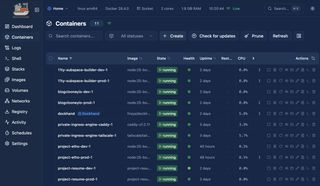
On top of that, I managed to eliminate local host port mappings entirely by using a shared network interface across these containers. No exposed ports on the host, no loose ends.
Why go this far? Because I love it being tidy. No extra surface area, no unnecessary plumbing, and a setup where every piece has a clear role and place.
The Devil is in the Details
One important note before getting into implementation: this pattern is not locked to Tailscale, Caddy, or NextDNS specifically. Those are just the tools I chose. You can swap any layer for an equivalent (private network, reverse proxy, DNS rewrite provider) and keep the same overall architecture.
The Template Repo
If you want to replicate this pattern, I published a starter template here:
private-ingress-engine-template
It includes the baseline Docker Compose and Caddy wiring used in this post, so you can adapt it to your own services.
The Architecture Diagram
Private Ingress Engine puts Caddy and your apps behind a Tailscale-only boundary.
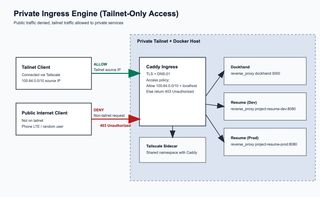
- Caddy is the ingress point for your private services.
- Tailscale sidecar provides tailnet connectivity on the Docker host.
- Tailnet clients (100.64.0.0/10) are allowed through.
- Public/non-tailnet clients are blocked first by DNS resolve failure
- no private rewrite / no route in normal public DNS.
- If a public client reaches ingress directly, Caddy still denies access with 403 Unauthorized.
- Allowed traffic is reverse-proxied to internal services:
dockhand:3000project-resume-dev:8080project-resume-prod:8080
Result: same hostnames, but only tailnet-connected users can reliably access services.
Security notes:
- Tailscale ACLs: keep ingress reachability scoped to your user/group/devices only.
- Key rotation: use short-lived, one-off Tailscale auth keys for enrollment; rotate DNS API tokens on a schedule and immediately after any suspected leak.
- Token storage: keep secrets out of git (
.env.templateonly), and inject real values at runtime from a secret manager (for me: 1Password +op run).
Prerequisites
Before implementing this pattern, make sure you have:
- A Tailscale tailnet with admin access (for DNS settings, ACLs, and auth keys)
- A domain and DNS provider API token that supports ACME DNS-01 (for example, Cloudflare)
- A NextDNS profile where you can create DNS rewrites
- Docker + Docker Compose v2 on the host machine
- A secrets workflow for runtime env injection (for example, 1Password
op run)
The Shared Docker Network Interface
Before this, I didn't know you can split the docker compose file into multiple ones and combine them and you can bring up the stack like this:
docker compose -f compose.yml -f compose.edge.yml up
This helps because all my services are public repos, but this no-host-port shared-network setup is only for my environment. Other people running my projects do not need to create the edge network interface.
I can keep a default compose.yml with the default network and host port mappings, and use compose.edge.yml to clear/reset port mappings and attach services to the external edge interface.
Tailscale & Caddy
Caddy uses network_mode: service:tailscale, which means it shares the exact same network namespace as the tailscale container:
Because Caddy does not publish host ports and sits behind Tailscale's interface, there is no direct host-level :80 / :443 exposure to your local LAN or the public internet.
Caddy
This is where the ingress behavior becomes explicit and predictable. Caddy is doing three jobs at once: proving domain ownership for TLS, routing hostnames to containers, and enforcing an allowlist at the edge.
Here is the exact Caddy config:
Domain-provider API Token
Caddy uses your domain provider API token to complete ACME DNS-01 challenges and issue certificates for your private hostnames. The token should be least-privilege and zone-scoped. For Cloudflare, a practical minimum is Zone:Read + DNS:Edit for only the zones you manage through this ingress.
Map All Containerized Services
Each virtual host in the Caddyfile maps cleanly to an internal Docker DNS target such as dockhand:3000 or project-resume-dev:8080. This is what lets you keep friendly domains (dev.resume.<domain>) while all real service addressing stays internal on the shared Docker network.
Allow & Deny
The remote_ip matcher makes access policy part of the web config itself. That means a request must both resolve privately and originate from an allowed source range. If anything hits ingress from outside the tailnet boundary, Caddy rejects it directly.
In other words: DNS rewrites make private names work, Tailscale provides the private path, and Caddy enforces that only that private path is accepted.
Rewrite DNS
You have two good options for private DNS rewrites in this pattern: NextDNS + Tailscale DNS, or Pi-hole + Tailscale DNS. I have used both. My personal preference is Pi-hole because it gives more control and aligns better with my self-hosted private philosophy. The caveat is that for consistent rewrites, Pi-hole should run on infrastructure that is always online (for example, a home server or a VPS).
Option 1: NextDNS + Tailscale DNS
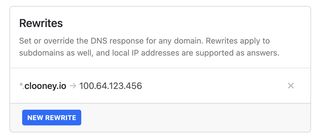
This is the easiest managed path. Use NextDNS rewrites (for example, mapping dev.resume.clooney.io to your ingress node's Tailscale IP), then let Tailscale DNS settings apply that resolver configuration across your devices.
Concrete rewrite example:
dev.resume.clooney.io -> 100.64.12.34 (example Tailscale IP for your private-ingress-engine node)
Option 2: Pi-hole + Tailscale DNS
If you want a self-hosted rewrite DNS path, the template now includes an example Pi-hole service:
In this option, Pi-hole handles local rewrite rules while Tailscale keeps resolver behavior consistent across your tailnet devices.
Quick troubleshooting checklist:
- Confirm your rewrite rule exists and points to the current Tailscale IP.
- Confirm your device is using the intended Tailscale DNS settings.
- Flush DNS cache on the client device/browser after rewrite changes.
- Check
tailscale statusto verify the ingress node is online. dig dev.resume.clooney.iofrom a tailnet client should return the private100.x.x.xtarget.- If TLS fails, verify
CF_DNS_API_TOKEN, zone permissions, and Caddy logs.
FAQ
Tailscale
Q: Auth key vs OAuth client/token in Tailscale. What should I use?
A: Use an auth key when a node just needs to join your tailnet (common for a single machine or container). Use OAuth when you are building automation that calls the Tailscale API. They solve different problems: node enrollment vs API access.
Q: Can an auth key expire in one day?
A: Yes. You can create short-lived auth keys (including one day) for safer enrollment.
Q: Is a Tailscale auth key one-time use?
A: It can be, and for this kind of setup that is usually preferred. A one-off auth key is consumed when the device successfully authenticates, then it is automatically invalidated for future enrollments.
Q: Why not use a reusable auth key here?
A: In this setup, we only need to authenticate one ingress container, so reusable keys add risk without adding value. A one-use key matches the use case and minimizes blast radius if the key is ever exposed.
Q: Is auth key expiry the same as node key/token expiry? Will my machine get kicked out when the auth key expires?
A: No, they are different lifecycles. Auth key expiry only affects new login/enrollment with that key. An already-authenticated machine keeps working and rotates its own node keys normally, so it is not kicked out just because the original auth key expired.
Q: Should this ingress node be ephemeral?
A: Not for this setup. Ephemeral nodes are meant for short-lived workloads and are automatically removed when they disconnect. For a stable ingress node, use a regular (non-ephemeral) node so it persists in your Tailscale device list and keeps a consistent identity.
Q: What happens if I recreate the Tailscale container? Does it break?
A: Not if you persist Tailscale state on the host. In this setup, the node identity survives container recreation because state is stored outside the container filesystem.
Docker / Compose
Q: Why split compose files instead of one big file?
A: It keeps the public/default setup clean for everyone, while your private overlay (compose.shared-network.yml) can remove host port mappings and attach services to your private edge pattern.
Q: Why no host port mappings?
A: Fewer exposed surfaces on the host and one controlled ingress path through Tailscale + Caddy.
Caddy
Q: Why use Caddy if Tailscale already gives access?
A: Caddy gives stable hostnames, centralized routing, and automatic HTTPS behavior across many services so you don't manage per-service commands/ports.
Q: What does Caddy proxy to in this setup?
A: Internal Docker DNS names (for example, resume-dev:8080) over the shared network.
Q: What happens if I recreate the Caddy container?
A: Routing config is easy to restore from your files, but Caddy still needs access to the DNS provider API token to manage certificates. Make sure that token is provided again via your environment/secret setup.
Q: How often should I rotate the DNS API token?
A: Rotate it on a regular schedule and immediately after any possible leak. A practical baseline is every 60 to 90 days, plus emergency rotation when credentials are exposed.
Q: What minimum DNS API token permissions should Caddy have?
A: Grant only the smallest set needed for DNS challenge updates on the specific zone(s) you use. Avoid account-wide or unrelated permissions; zone-scoped DNS record edit/read is usually the right target.
Rewrite DNS
Q: Why use DNS rewrites here?
A: Rewrites let you type human domains while still resolving to private tailnet-reachable targets.
Q: Why combine rewrite DNS with Tailscale DNS?
A: Tailscale can distribute DNS settings to your tailnet devices, and either NextDNS or Pi-hole can provide the custom rewrite behavior, so every device gets the same private naming experience.
What I Want to Improve Next
-
DONE! "Replace hosted DNS rewrites with a self-hosted path (Pi-hole or CoreDNS) to reduce external dependency and keep more of the stack local."
-
Improve resource efficiency across my Eleventy stacks, especially reducing steady-state memory usage for always-on dev/prod containers.
Closing Thoughts
This setup gave me exactly what I wanted: private services that feel like a real production ingress stack without becoming publicly exposed. I still get clean domains, HTTPS, and centralized routing, but access stays scoped to my tailnet and my devices.
More importantly, it scales with how I work. I can add new services, map them once in Caddy, and keep everything consistent across environments without memorizing ports or running one-off commands.
If you are building in public but operating infrastructure privately, this pattern is a practical middle ground: cloud-like ergonomics, self-hosted control, and a smaller attack surface.